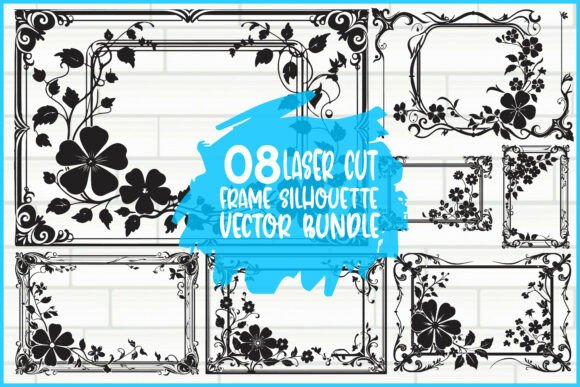
Evaluating the Decorative Frame Silhouette Vector Bundle for Cutting Projects
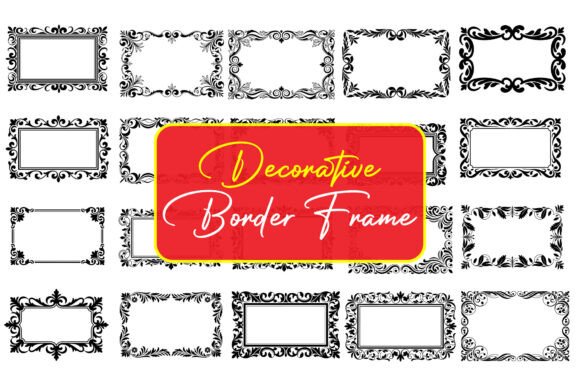
In the realm of digital crafting and custom fabrication, selecting the right design assets is a critical step that influences both the workflow efficiency and the quality of the final product. A Decorative Frame Silhouette refers to a specific type of vector graphic designed to create ornamental borders or enclosures, typically characterized by intricate cut-out patterns that leave a central negative space for photos, text, or other focal points. For crafters, designers, and small business owners, understanding the utility and limitations of these assets is essential before integrating them into projects involving machines like Cricut, Silhouette Cameo, Glowforge, CNC routers, or laser cutters.
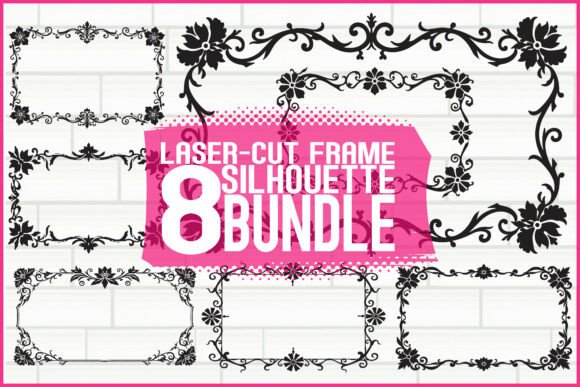
The specific bundle in question comprises eight elegant floral and decorative frame designs. While the aesthetic appeal is immediate, a practical evaluation requires looking beyond the visuals to assess file versatility, machine compatibility, and suitability for various end-use scenarios. This analysis aims to provide a balanced perspective on whether this collection aligns with your specific project goals.
Understanding the Asset Composition
At its core, a Decorative Frame Silhouette in this context is not merely an image but a set of mathematical paths defined in vector formats. The inclusion of multiple file types—SVG, EPS, AI, PDF, PNG, and JPG—indicates a comprehensive approach to compatibility.
- Vector Files (SVG, EPS, AI, PDF): These are the most critical for cutting machines. They allow the design to be scaled infinitely without losing resolution, ensuring that the intricate details of the floral patterns remain sharp whether the frame is two inches or two feet wide.
- Raster Files (PNG, JPG): High-resolution PNGs with transparent backgrounds are useful for digital mockups, sublimation previews, or printing directly onto paper where cutting is not required.
The presence of eight distinct designs offers a moderate level of variety. For a user needing a cohesive look across a single event, such as a wedding suite, having a matching set of frames can streamline the design process. However, users requiring a vast library of disparate styles might find eight designs limiting unless they plan to modify the vectors significantly.
Practical Applications and Fit
Determining whether this bundle is a strong fit depends largely on the intended application. The versatility of the Decorative Frame Silhouette makes it suitable for several high-value use cases:
- Invitations and Greeting Cards: The intricate nature of laser-cut or die-cut frames adds a premium tactile element to paper goods. When used with cardstock, these silhouettes create depth and shadow, elevating a standard invitation to a luxury item.
- Wall Décor and Photo Frames: For homeowners or interior designers, these vectors can be translated into wood or acrylic. A laser cutter can easily interpret the paths to create freestanding frames or wall-mounted art pieces where the "silhouette" acts as the primary decorative element.
- Scrapbooking: The scalability of SVG files allows crafters to resize frames to fit specific photo layouts without pixelation, making them ideal for personalized memory books.
If your goal is to produce physical goods for sale, such as at craft fairs or through an online store, the "easy to cut" claim is a significant factor. Designs that are overly complex can lead to weeding difficulties (removing excess material) in vinyl cutting or burn marks in laser cutting if the lines are too close together. A well-optimized silhouette balances detail with structural integrity, ensuring the frame does not fall apart during the weeding or assembly process.
Tradeoffs and Considerations
While the benefits of using pre-made vector bundles are clear, there are tradeoffs to consider. First, the exclusivity of the design is a common concern. Since these bundles are often sold to multiple customers, there is a possibility that another business may use the exact same Decorative Frame Silhouette. For large-scale brands seeking unique intellectual property, purchasing a custom-designed vector or modifying these existing files substantially is advisable.
Secondly, machine capability plays a role. While the files are labeled as compatible with Cricut, Silhouette, Glowforge, and CNC, the material choice dictates the success of the cut. Intricate floral details in a silhouette may be too delicate for thick hardwood on a hobbyist laser cutter, potentially leading to breakage. Conversely, very fine details might be lost when cutting thick cardstock with a blade-based cutter if the pressure settings are not calibrated perfectly. Users must evaluate their specific machine's tolerance for fine detail against the complexity of these eight designs.
When to Consider Alternatives
There are situations where this specific bundle may not be the optimal choice. If a project requires highly specific thematic elements not covered by "floral and decorative" motifs—such as geometric, industrial, or seasonal themes unrelated to flowers—users should look for specialized packs. Additionally, if a project demands 3D layering effects that require separate files for each layer of depth, a single-layer silhouette bundle might require additional manual work in vector editing software to separate elements.
Furthermore, users who are beginners in vector editing might find the variety of file formats overwhelming. While having AI and EPS files is beneficial for Adobe Illustrator users, a crafter relying solely on basic browser-based tools might only utilize the SVG and PNG files, rendering the other formats redundant for their specific workflow.
Decision-Making Insights
To determine if this Decorative Frame Silhouette bundle aligns with your needs, ask the following questions:
- What is my primary material? If you are working primarily with delicate paper or thin acrylic, the detailed floral cuts are likely ideal. If you are cutting thick plywood, verify the line thickness in the preview images to ensure structural stability.
- Do I need to edit the vectors? If you plan to combine these frames with other elements, ensure you have software capable of opening AI or EPS files. If you only need drag-and-drop functionality, the SVG format provided will suffice for most cutting machine software.
- Is volume or variety more important? With eight designs, this bundle offers a curated selection rather than an exhaustive library. It is best suited for projects needing a consistent aesthetic rather than a wide array of unrelated styles.
In conclusion, this vector bundle represents a practical resource for those looking to add elegance to their cutting projects without designing from scratch. The inclusion of comprehensive file formats ensures broad compatibility, while the focus on floral and decorative themes caters to popular markets like weddings and home décor. However, success ultimately depends on matching the design complexity to your machine's capabilities and being aware of the non-exclusive nature of stock vector assets. By carefully weighing these factors, crafters and business owners can make an informed decision on whether these silhouettes will effectively serve their creative and commercial objectives.